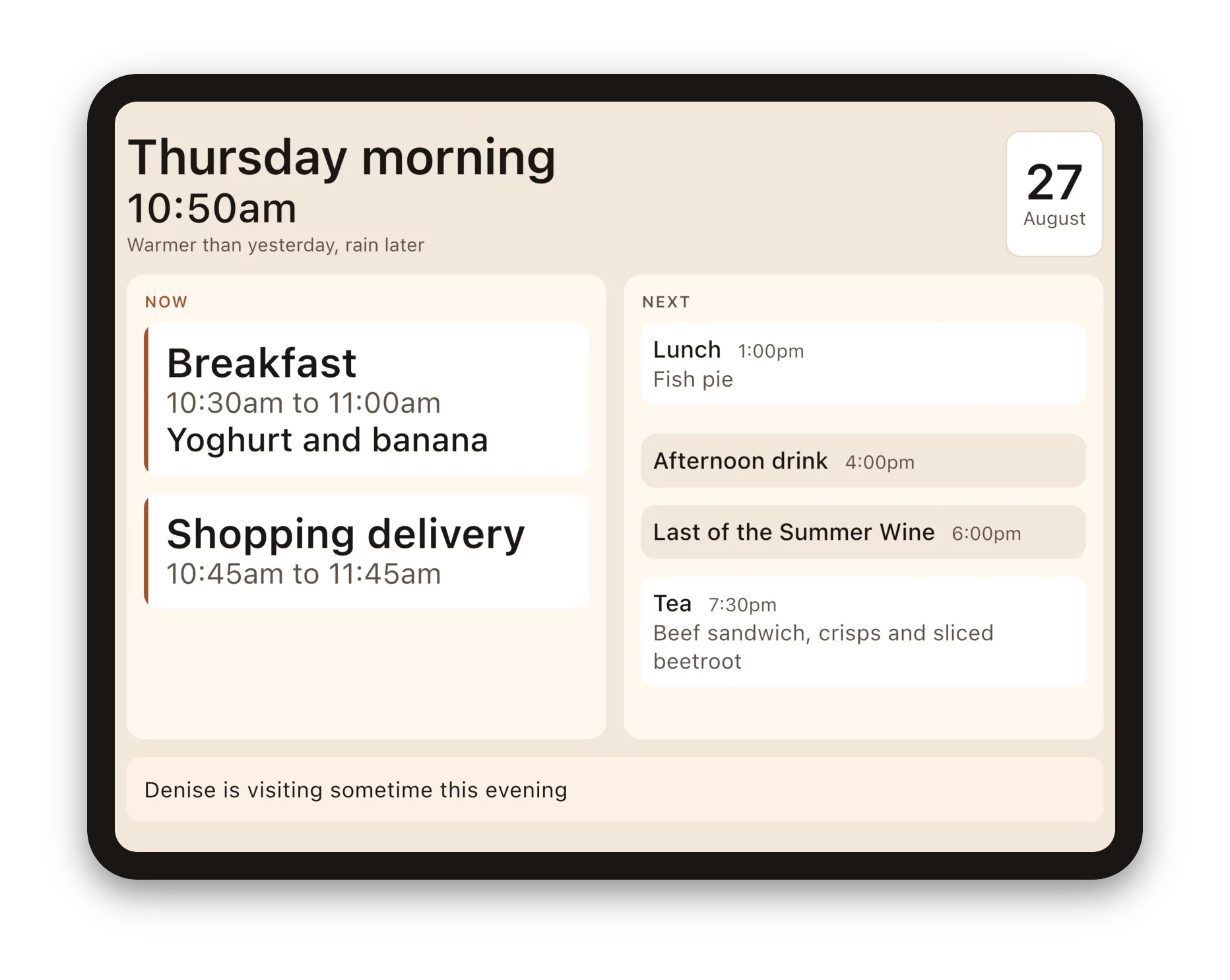
If you're looking for a day clock for someone in the early stages of dementia, you'll have seen the kind that shows Tuesday morning in big letters on a screen by the chair. They're popular for a good reason. Knowing what day it is and which part of the day you're in is the question that keeps coming back, and a clock that answers it all day, without anyone having to ask, is calming.
Daysome does that on a tablet. It also answers the next question: what's happening now, and what comes next.
What's on the screen
- The day and the part of the day, in large plain words, with the time nearly as large.
- What the weather's like compared with yesterday, in words rather than numbers: "Warmer than yesterday, rain later" or "Mild again today". No degrees and no symbols to work out.
- What's happening now and what's coming next, in two places that never move.
- What's for each meal, so "what's for tea?" has an answer on the screen.
- Regular visitors, like the cleaner or the shopping delivery, on the days they actually come.
- Birthdays and other special days, in your own words, all day long.
- A note from the family, which takes itself down when it stops being true.
Between things, it says how long there is, the way a person would: "half an hour until tea", never "34 minutes". And a soft bell can sound when something starts, for when the screen isn't being looked at.
What it never does
It never says anything has been missed. There's no red, no "overdue", and nothing crossed out. When something's time has passed, it quietly drops off the screen. A display that points out what's gone wrong can unsettle someone who was perfectly settled, and it doesn't help anyone.
There's nothing to tap, either. The screen is there to be read from across the room, and touching it does nothing, so it can't be changed or closed by accident.
Daysome isn't a medical device and makes no medical claim. It shows the day you set up, in the words you choose.
Why a tablet rather than a clock
Lots of people already reach for an iPad or tablet all day long. If that's true of the person you're thinking of, it's the obvious place for the answer to be. It's one less device in the room, and the screen is big enough to show the whole shape of the day, not just its name.
It also means the day can change without anyone visiting. You set it up once on the tablet, behind a PIN. After that, changing tonight's tea takes a few taps. Or connect the tablet to a household here on daysome.org, and you, or a brother or a neighbour, can change the day from your own phone or computer wherever you are.
If the person you're thinking of doesn't use a tablet at all, a dedicated clock may suit them better. We'd rather say so.
Questions people ask
Is Daysome a dementia clock?
It does the job of one, with the rest of the day added. It was built for a family member in the early stages of dementia who's happy at home and was starting to lose track of mealtimes and her favourite programmes. It's for anyone who'd find the day easier with its shape in front of them.
Which tablets does it work on?
iPad, Android tablets, and Amazon Fire tablets. It's on the App Store, Google Play and the Amazon Appstore. On the home screen its icon just says My Day.
Does it need the internet?
No. Everything on the screen works without a connection. The weather line needs one, and so does changing the day from another phone or computer.
What does it cost?
Daysome is free on the tablet, with no account and no adverts, and it stays that way. A household plan which starts with a feee trial, connects the tablet so that family and carers can change the day and you can have more tablets displaying the same day.
Can the tablet be kept on Daysome?
Yes. Keep it on a stand and plugged in, and Daysome keeps the screen awake. On an iPad, Assistive Access, in Settings, can limit the tablet to Daysome and a few apps you choose. On Android 'Bring the day back' is a setting.
Will it tell them they've forgotten something?
No, never. It only ever shows what's happening now and what's next.