
Daysome changelog
Notable releases and milestones for Daysome, the calm daily display. Release themes are named for the sea areas of the Shipping Forecast, taken in the order they are read out — a list recited at the same hours every day for a century, which is the closest thing broadcasting has to the point of this app.
| Version | Summary |
|---|---|
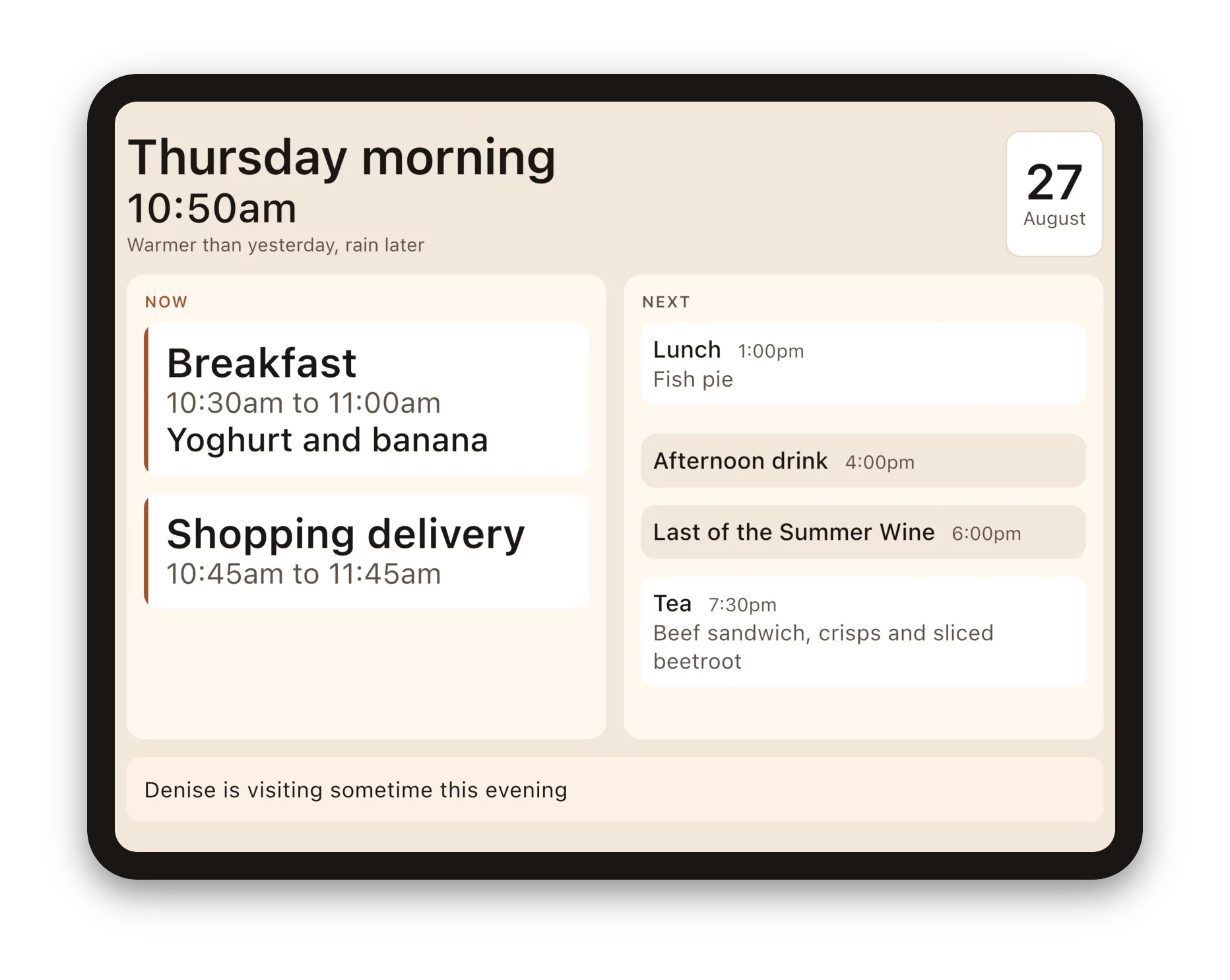
| 0.1.0 (beta20–25) | Fisher — starting over, properly. Clearing the example household and erasing everything are two different things and are now two different buttons, under Reset your data. Clearing the example empties the day ready for your own and leaves your PIN alone — and it only appears while there is still an example to clear, so it can never take a routine you entered yourself. Erasing all content and settings does what it says, PIN included, and puts the iPad back to how it arrived. The example day also lost its medication and gained a television programme at six on weekdays, which is a better example of what the app is for. And whatever is happening now is drawn in white, so it is the brightest thing on the screen — it used to be that a meal later in the day could out-shout the thing in front of you. The settings gained an About page, so you can see which version you have without going back to the store — it is the first thing we will ask if you write to us — along with the licences for the open-source code Daysome is built on. In the example household the shopping delivery now arrives during breakfast rather than tidily after it, which is what a real delivery does — and it shows what the display does when two things are happening at once. The settings also go back to the day after half a minute again, as they were always meant to — they had quietly started taking three. |
| 0.1.0 (beta18–19) | Tyne — it speaks up, and it remembers birthdays. The display now makes a soft sound when something starts, so it works whether or not she happens to be looking at it. One low bell — not a doorbell and not a phone, because neither of those should be a thing this app can seem to be. Meals, drinks, tablets and visitors chime by default; the shape of the day does not, and everything can be set on its own. There is a Hear it now button in the settings, because whether the volume is up is most of whether any of it works. And special days: a birthday or an anniversary, written in your own words, showing all day. They are kept in a list you can see and take things off — a date that comes round every year should never be something nobody can find. Setting one asks for a month and a day, with no year to argue about. And the household's meal lists — what you actually eat, as opposed to what is on which day — now have a place of their own in the settings instead of being tucked behind a particular meal on a particular day. |
| 0.1.0 (beta17) | Forth — room to grow. The carer's settings had become one long screen with everything piled at the bottom of it. Behind the PIN there is now a short menu: today, meals for the week, the routine, the weather, the screen, the PIN. Today is the first thing on it and there is a Today button in the bar from everywhere else, so the day is never more than one tap away. The routine — everything that happens and which days it happens on — has a page of its own instead of sitting under today's list. Editing a meal now shows what is actually on the plate rather than saying nothing was chosen, and the clock and battery are legible again on the display. |
| 0.1.0 (beta16) | Cromarty — snags off a real device. Clearing the town left yesterday's weather phrase on the display; it now goes when the town does. The weather settings say plainly that this is the only part of Daysome needing a network, that it works without one, and what the weather service is and is not given — with links out to Open-Meteo and to the licence. Finding a town is clearer to use: a heading, a proper search box and a line saying what to do. |
| 0.1.0 (beta15) | Cromarty — the words it uses about people. The settings said "her display" and "what she would be having". The next household is as likely to be a father as a mother, so nothing in the app assumes any more — it names the thing where it can, and says "they" where a person is meant. The weather settings now show the phrase that is on the display, so you can see what it says without leaving the room, and credit the weather service beside it. Underneath, plainly it states that this is the only part of Daysome that needs a network, it works without one, and the service is not given anything linked to anybody. |
| 0.1.0 (beta14) | Cromarty — the weather, for real. The line under the date has always said what sort of day it is — "warmer than yesterday, rain later" — and until now it said the same thing every day. Name a town in the settings and it is true: yesterday's temperature as it actually turned out, compared with today's, in the words a person would use rather than a figure to interpret. Where little has changed it describes the day instead of comparing it, because "about the same as yesterday" does not tell you whether to put a cardigan on. Rain is mentioned only while it is still ahead of you. The app never asks the device where it is, and it needs no location permission: a carer names the town once. With no connection the last phrase stays up, and it is never left up on the wrong day. |
| 0.1.0 (beta8–13) | Forties — the carer's half catches up. The display was ahead of the surface behind it, and this closes the gap. Meals can now be planned a week out rather than only for today, which is what a carer who visits twice a week actually needs; the whole routine is visible, so a weekly cleaner is no longer invisible six days in seven; and a meal can be chosen from any of the household's lists, because in a real house a ready meal is a ready meal. Every step has a way back that does not throw the carer out onto the display. On an iPad the pickers and dialogs are Apple's own. And the bundled example household can finally be cleared — it could not be before, which also meant an example note about a visitor who does not exist stayed on the display for good. On the display itself, two things happening at once are now both shown, and the sentence that counts down to what is coming names both of them. Three snags found on real phones close it out: the way into the carer's settings was too small on a tall screen, clearing the example household gave no sign that it had worked, and the app called every device an iPad. |
| 0.1.0 (beta7) | South Utsire — ready for the stores. The whole listing: a launcher icon and feature graphic drawn from scratch, full store copy, and a scripted screenshot set covering the App Store's 13-inch iPad and both iPhone sizes, Google Play's phone and 7- and 10-inch tablet slots, and the Amazon Appstore's Fire Max 11. Accessibility Nutrition Labels answered honestly rather than optimistically, which meant earning Reduced Motion — the one route transition in the app now stands still when the setting is on. Eight dependencies that nothing imported came out, taking POST_NOTIFICATIONS and VIBRATE with them; the release build now asks for no user-visible permission at all. |
| 0.1.0 (beta5–6) | North Utsire — a second target, and a display that measures itself. Amazon Fire tablets confirmed as a real target rather than a curiosity, with the constraint that follows — no Google Play Services — made executable by a release audit that fails the build if one ever appears. Reading the real numbers off a Fire Max 11 immediately found a bug the guessed ones had not, and the fix ran deeper than the bug: every part of the display now measures what it is about to draw, at the width it will be drawn in, instead of assuming a worst case. The schedule stopped shedding rows it had room for, and a 7-inch tablet stopped dropping the weather line and the date off a page that was a third empty. |
| 0.1.0 (beta1–4) | Viking — the display, and a route to both stores. The first working day display: the weekday and part of the day in large plain words, the time nearly as large, what is happening now and what is next in two slots that never move, a menu on each meal, the weekly visitors that make a Monday unlike a Friday, and a note from the family that takes itself down when it stops being true. Behind five taps in a corner and a PIN, supervisor mode — the whole day, editable, with the meal swap it exists for. The screen holds itself awake, the household survives the iPad going flat, and Fastlane and self-hosted CI carry the same tag to TestFlight and Play Internal. |
- Details
- Written by: Angus Fox
Daysome support
Daysome shows someone their day, large and calm, on a tablet they already have. On the home screen its icon reads My Day. This page answers the questions that come up most, and tells you how to reach a person.
There is nothing on the screen to tap. Is it broken?
No — that is the app working as intended. The display is meant to be read from across a room and to be completely useful to somebody who never touches it, because the days it matters most are the days they will not. There are no buttons, no menus and nothing to dismiss.
Everything you might want to change lives behind the settings, below.
Getting to the settings
Tap five times in the top-right corner of the screen, within five seconds. There is nothing drawn there to tap — that is deliberate, because anything that looked tappable would be one more thing for the person to wonder about.
The first time you do it, Daysome asks you to choose a four-digit PIN and to type it again to confirm. There is no default PIN and nothing to look up: choose any four digits and write them down somewhere the family can find them.
The settings close themselves after thirty seconds without a touch, and go back to the display. That is on purpose — a carer called away mid-change must not leave the tablet sitting on a settings screen. Tap five times again to go back in.
Changing what the day says
Inside the settings you will find the whole day, top to bottom. Tap any line to change what sort of thing it is, what it is called, when it starts and finishes, and how often it happens — every day, certain days, or one day only.
Use the household's own words. If the evening meal is Tea in your house, call it Tea. If there are four meals, add a fourth.
Swapping today's meal
Meals are the one thing that changes daily, so they are the quickest thing to change. Open the settings, tap the meal, and pick from the family's list. Four taps, standing in the kitchen, holding something cold.
You can add to and remove from that list at any time. It is worth keeping it matched to what is actually in the freezer, because a list that has drifted is one people stop using.
The note of the day
The note is the line at the foot of the display — "Denise is visiting sometime this afternoon". Write it in the settings, and say when it stops being true: this morning, this afternoon, this evening, or today.
Daysome takes it down on its own at the end of that part of the day. A note promising a visitor who has already been and gone is worse than no note at all.
Something is missing from the display
On a smaller screen, Daysome shows what fits rather than shrinking everything until it cannot be read. If something has dropped off, it will be from the end of the day rather than the next thing due — what is happening now and what is next are never given up.
Turning the tablet to landscape usually brings more back.
The screen keeps going dark
Daysome holds the screen awake while the display is showing, and that is on by default. You can turn it off in the settings. It only really makes sense with the tablet plugged in.
How do I keep the iPad on Daysome?
This is the question we are asked most, and the iPad has a proper answer to it: Assistive Access. It is Apple's own, built in, and Daysome is set up to work with it — the iPad lists My Day as an optimised app, and the day fills the whole screen with nothing else around it.
Turn it on in Settings → Accessibility → Assistive Access. It will walk you through choosing which apps are allowed and setting a passcode. Choose My Day.
Write the passcode down somewhere you will find it. It is not the iPad's usual passcode, it is a separate one, and it is what gets you back out.
To leave Assistive Access, press the top button three times quickly and enter that passcode.
You do not have to leave it to change the day. The five taps in the corner and your PIN still work from inside Assistive Access, exactly as they do the rest of the time, and the display still turns round if you move the iPad.
Is Assistive Access better than Guided Access?
For this, yes, and for one reason that matters more than any other: it survives the iPad being switched off.
Guided Access ends when the iPad restarts. So a flat battery, or somebody unplugging it to hoover and forgetting, leaves the iPad back on its ordinary home screen — usually without anybody noticing until somebody goes looking for the day and it has gone. Assistive Access comes back on its own.
One thing to be clear about before you turn it on: it changes the whole iPad, not just Daysome. The home screen becomes large simple buttons and only the apps you chose will open. That is the point of it, and it is right for some households and too much for others. You can turn it off again at any time with the passcode, and nothing is lost when you do.
It needs iPadOS 17 or later. If you cannot find it in Settings, the iPad is on an older version.
The day looks wrong after the iPad has been off
It should not. Daysome writes the household's day to the tablet as you change it, and reads it back before it draws anything, so a tablet that loses power comes back showing the same day it was showing before.
If it has come back showing an unfamiliar routine, tell us — that is a fault and we want to know about it.
Do I need an account?
No. Daysome needs no account, no sign-in and no internet connection. Nothing about the household leaves the tablet.
Talk to a person
It helps to tell us which tablet it is, which version you are on, and what the screen actually says — a photograph of it is worth a page of description.
Contact
We aim to answer emails to
Daysome is made by Multizone Limited, Mobile apps, software and product management consulting since 1998. Registered in England and Wales, company no. 3504416. Leatherhead, KT23 4JY, United Kingdom
- Details
- Written by: Angus Fox
Daysome privacy policy
This policy covers Daysome, the daily plan shown on an iPad or tablet for someone in the early stages of dementia. On the home screen its icon reads My Day. It is published by Multizone Limited and it is deliberately short, because there is very little to say.
Last updated 25 August 2026.
The short version
The Daysome app collects nothing. It currently has no account, no sign-in, no analytics, no crash reporting and no advertising. It makes no network requests of any kind. Everything it knows stays on the device it is installed on, and none of it reaches us or anybody else.
That is not a promise about how carefully we handle your information. It is a statement that we do not have any.
What the app stores, and where
Daysome keeps one thing: the day itself. The routine — what happens, at what time, and on which days — the family's list of meals and which one was chosen for today, the note of the day, and the four-digit PIN chosen for the settings screen.
It does not keep the name of the person it is for. There is nowhere to enter one, and the app never asks.
All of it is written to the device's own app storage as plain text, by the operating system, in the space iOS and Android set aside for the app. It is removed when the app is deleted. It is never uploaded, backed up to us, or transmitted anywhere.
What the app deliberately does not store
No name at all — not a surname and not a first name. No date of birth. No address. No diagnosis. No medication names, doses or strengths.
That last one is a design rule rather than an oversight: Daysome shows a reminder and a time — "First set of pills, after breakfast" — and never what is in the dosette box. Storing less means there is less to lose, and it keeps the household's information well clear of the sensitive categories UK data protection law treats differently.
Permissions
Daysome asks for no permissions. No camera, no microphone, no location, no contacts, no calendar, no notifications, no storage access.
Deleting the data
Delete the app. Everything goes with it, because everything was on the device.
There is nothing to request from us, because we hold nothing. If you would like that confirmed in writing, ask and we will confirm it.
Children and vulnerable adults
Daysome is chosen and set up by a family member or a carer, not by the person whose day it shows. It is not directed at children. Because it holds nothing and sends nothing, using it creates no record of the person anywhere outside their own home.
When this changes
A future version of Daysome will let a family member update the day from their own phone, which means a household's plan will be stored on a server we run in the United Kingdom. That is a real change and it will be described here, in full, before it ships — alongside updated privacy information on the App Store and Google Play.
The rules above about what is never stored will not change when it does.
This website
Everything above is about the app. This section is about daysome.org, which is a different thing and does collect information — because a form has to.
Reading the site collects nothing. There is no analytics, no advertising and no tracking. The only cookie is the one that keeps you signed in if you have an account, and it goes when you sign out.
What the forms collect
Two forms: one to apply to be a tester for a version of the app before it is released, and one to ask us for help. Between them they collect your name, your email address, which device you use, and whatever you choose to write to us.
We use the data you give us in these forms to reply to you, and to send you the test build if you have asked for one. Nothing more.
Every form is confirmed by email. When you submit one we send a message with a link in it; nothing is kept and no reply is sent until you follow it. If you never do, the submission is discarded. That is deliberate: it means an address only reaches our list if the person who owns it says so.
What we deliberately do not ask
Nothing about the person the app is for. Not their name, not their diagnosis, not what stage they are at, not what they take.
The app is built to avoid that information — it holds times and the words a family chose, and not one thing about the person — and it would be a poor sort of care to collect on a web form what we took trouble to keep off the tablet. If you tell us anyway in a message, we will use it to answer you and delete it with the rest.
What we will email you, and what you can turn off
Updates about Daysome. A test build is ready, a release is out, something you reported is fixed. If you have asked to test the app or asked us for help, these come with it — there is no point being on a test you cannot be told about. They are only ever about this app, and there are not many of them.
News about Daysome and other Multizone apps. Optional, off unless you ask for it, and never a condition of getting help or a place on the test.
Every email we send carries a one-click unsubscribe, and you can always just ask us. Unsubscribing from the news does not take you off the test; leaving the test stops the updates.
If you make an account
Registering creates an account on this site holding your name, email address and password. It is there so a future subscription can be attached to your family rather than to one particular iPad or tablet, and so you can change your own settings. You can ask us to delete it at any time, and we will.
Who else sees it
Our email is sent through Postmark, which delivers it and handles unsubscribes. They process it on our instructions and for no purpose of their own. Their servers are in the United States, and that transfer is governed by the data protection terms in our contract with them.
Nobody else. We do not sell anything to anybody, and there is nothing here worth selling.
How long we keep it
| What | How long |
|---|---|
| A form submission that was never confirmed | Deleted within 30 days |
| A support conversation | 12 months after it is finished |
| A test application | Until the test programme ends, then 6 months |
| Your place on the news list | Until you unsubscribe, or 24 months without a response |
| A user account | Until you ask us to delete it |
Your rights
You can ask us for a copy of what we hold about you, ask us to correct it, ask us to delete it, or object to what we are doing with it. Ask at the address below and we will answer within a month.
Multizone Limited is registered with the Information Commissioner's Office as a data controller, registration number ZA366637.
If you are not satisfied with how we have handled something, you can complain to the ICO at ico.org.uk. We would rather you told us first, but you do not have to.
Contact
We aim to answer emails to
Daysome is made by Multizone Limited, Mobile apps, software and product management consulting since 1998. Registered in England and Wales, company no. 3504416. Leatherhead, KT23 4JY, United Kingdom
- Details
- Written by: Angus Fox
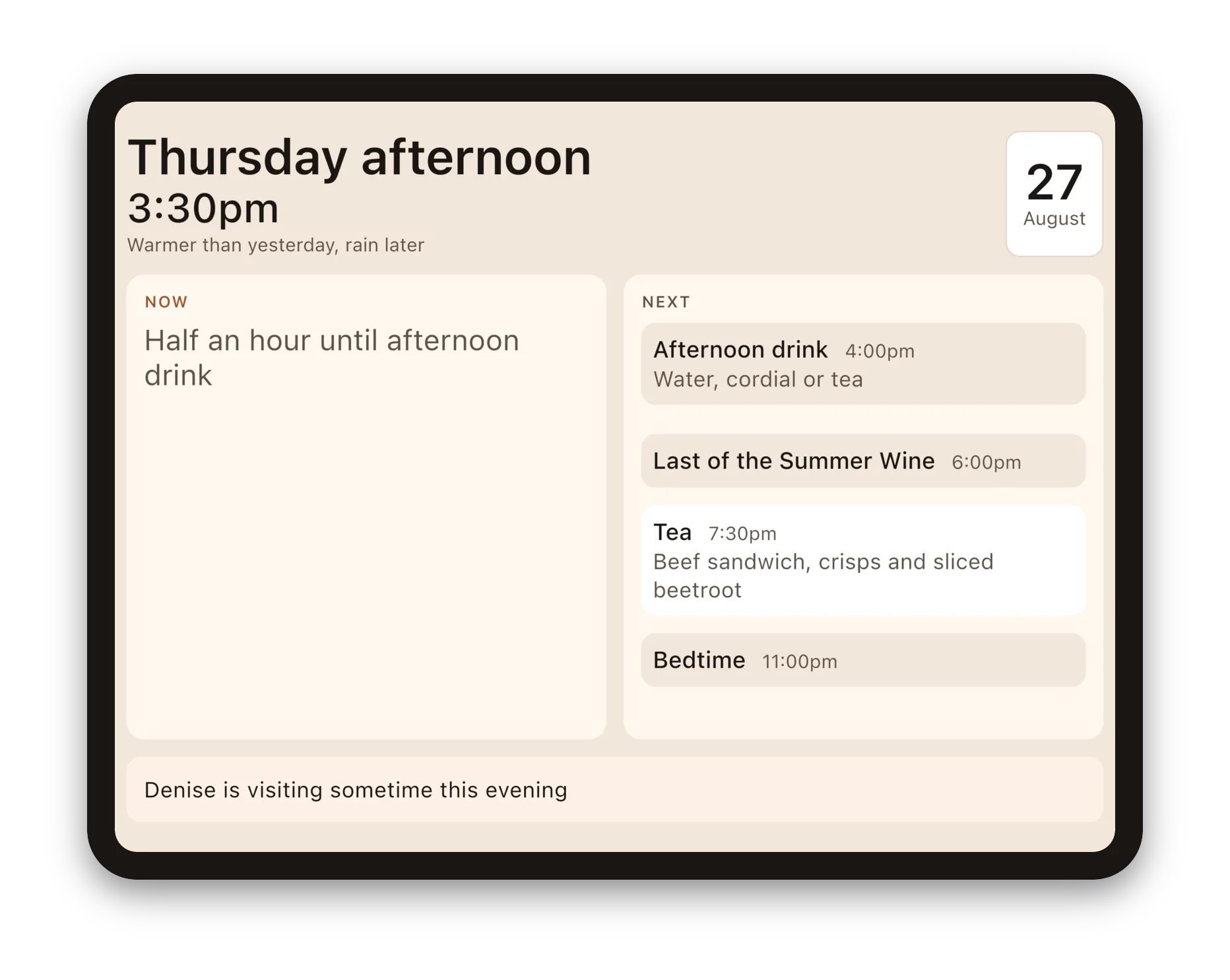
What day it is, what is happening now, and what is for tea.
Daysome shows one person, on one iPad, the shape of their own day. That is the whole thing. There is nothing to tap.
Who it is for
It was built for a family member in the early stages of dementia — happy, settled, living at home, and starting to lose track of when to eat, when to drink and when to take her tablets. She reaches for her iPad all day long, so that is where the answer lives.
If that sounds like somebody in your family, it may help. If it does not, it probably will not, and we would rather say so.
What is on the screen
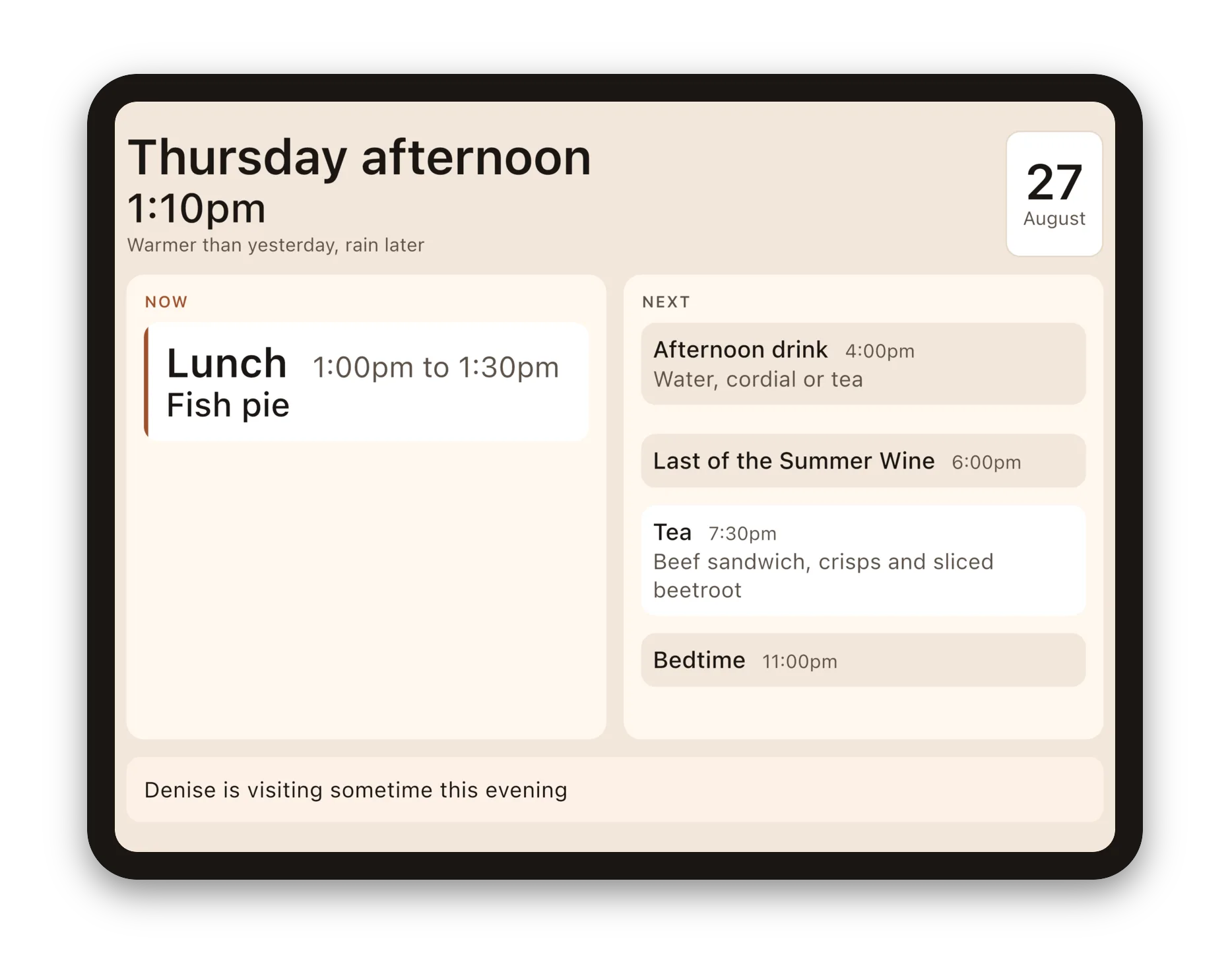
The day and the part of the day, in large plain words. The time, nearly as large. What is happening now, and what is coming next, in two slots that never move. What is on the menu for each meal. Weekly visitors — the cleaner, the shopping delivery — on the days they actually come. And a note from the family, which takes itself down when it stops being true.
Between things, it says how much time there is. "Half an hour until tea" — in quarters and halves, the way a person says it, never "34 minutes".
What it never does
It never says anything has been missed. No red, no "overdue", nothing struck through. Something whose time has passed simply drops off the display.
A screen that tells someone with dementia they have failed creates anxiety in a person who was otherwise settled, and buys nothing back.
It shows no dose, no drug name and no clinical instruction. A line says "First set of pills, after breakfast" and points at the dosette box, which remains the only thing that knows what has actually been taken. Daysome is not a medical device and makes no medical claim.
What you do
You set the day up once, from the same tablet, behind a PIN. After that the only thing that changes daily is what is for dinner, and that is four taps standing in the kitchen holding something cold.
What it costs, and what it keeps
Daysome is free on the tablet, and it stays free. There are no adverts and there never will be.
It needs no account and no internet connection. Everything it knows — the routine, the meals, the note — stays on the tablet and reaches nobody, including us. See the privacy policy, which is short because there is very little to say.
Getting it
Daysome is coming to the App Store, Google Play and the Amazon Appstore. On the home screen its icon reads My Day, because that is true and plain to the person using it, whatever we call it here.
Help
The support page answers the questions that come up most, starting with the one everybody asks first: there is nothing on the screen to tap, and that is the app working as intended.
Contact
We aim to answer emails to
Daysome is made by Multizone Limited, Mobile apps, software and product management consulting since 1998. Registered in England and Wales, company no. 3504416. Leatherhead, KT23 4JY, United Kingdom
- Details
- Written by: Angus Fox